Understanding Cloud Computing : A Simple Overview
I'm a dedicated DevOps professional with 3 years of experience in automating. deploying and managing cloud infrastructure. Proficient in CI/CD pipelines, containerization (Docker, Kubernetes), cloud platforms (AWS, Azure), and scripting (Python, Bash), I am focused on enhancing system reliability. scalability, and performance. I am passionate about continuous integration and delivery practices and have hands-on experience with various AWS cloud computing services, including EC2, VPC, RDS, and CodePipeline. My expertise lies in driving efficient and effective DevOps solutions to support and optimize business operations.
Definition of Cloud Computing
Cloud computing is the delivery of computing services like servers, storage, databases, networking, and software.
It is the processing of accessing the data or application via the internet.
Definition of DevOps
DevOps is a set of practices that combines software development (Dev) and IT operations (Ops) to shorten the systems development life cycle and provide continuous delivery with high software quality.
DevOps is not a tool, technology, or framework.
DevOps is a cultural movement, mindset, and philosophy to coordinate and produce better, more reliable products by automating infrastructure and workflow and continuously measuring application performance, for which they use a lot of tools.
Everyday Examples of Cloud Computing
Google Drive & Dropbox
Email Services
Netflix & Spotify
What is cloud computing?
Cloud computing is like renting space and services on someone else's powerful computer instead of buying your own.
Imagine you need to store files, run a program, or host a website.
Instead of buying and managing expensive servers, you "borrow" resources from cloud providers like Amazon Web Services (AWS), Microsoft Azure, or Google Cloud Platform (GCP) over the internet.
Key Benefits of Cloud Computing 💡
Cost-Effective: No need to buy expensive servers; you only pay for what you use.
Scalable: Need more resources? Add them with a few clicks. Need less? Scale down anytime.
Accessible: Work from anywhere, anytime, as long as you have an internet connection.
Reliable: Top providers ensure 99.9% uptime, meaning your services are rarely down.
Types of Cloud Computing
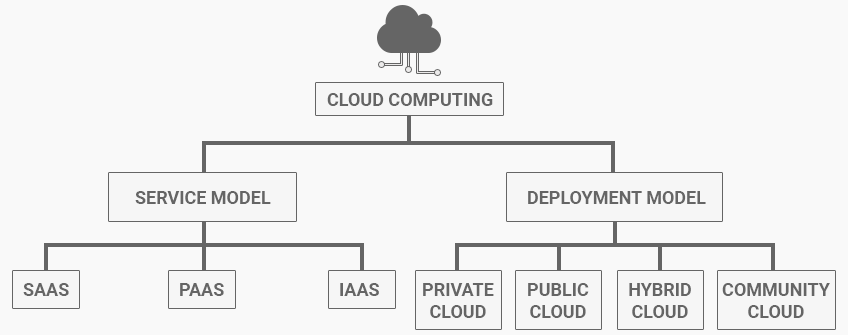
Service Model:
Cloud computing offers three main service models
IAAS : Infrastructure As A Service
PAAS : Platform As A Service
SAAS : Software As A Service
Infrastructure as a Service (IaaS)
IaaS provides raw computing resources like virtual servers, storage, and networks.
You manage everything on top of that, like the operating system, apps, and data.
Example : AWS EC2, Microsoft Azure VMs, Google Compute Engine.
Platform as a Service (PaaS)
PaaS offers a ready-to-use platform where developers can build, test, and deploy applications without worrying about the underlying infrastructure.
Ordering a pre-made pizza base and adding your favorite toppings.
Example : Google App Engine, AWS Elastic Beanstalk, Microsoft Azure App Services.
Software as a Service (SaaS)
SaaS delivers software applications over the internet, ready to use. You don’t need to install or maintain anything.
Streaming Netflix instead of downloading or buying DVDs.
Example: Gmail, Microsoft Office 365, Zoom, Slack.
Deployment Models
Cloud computing offers different ways to deploy its services, depending on your needs.
These are called deployment models, and they define where your cloud resources are hosted and who has access to them.
Public Cloud
The public cloud is like a library.
It’s open to everyone, and you share resources with other users.
Big companies like AWS, Azure, and Google Cloud own these public cloud platforms and let you "rent" their servers, storage, and software.
Example:
- Hosting your company’s website on AWS EC2. You don’t need to own the servers; AWS manages everything.
Pros:
Affordable: You only pay for what you use.
Scalable: Add more resources anytime.
Accessible: Access from anywhere with the internet.
Cons:
- Shared environments may have security concerns for sensitive data.
Private Cloud
The private cloud is like owning your personal library.
Only your company can access it, and the resources are dedicated entirely to you.
It’s hosted either on-site (your own servers) or by a third party exclusively for you.
Example:
- A bank managing its sensitive customer data in its private cloud for enhanced security.
Pros:
Secure: Dedicated infrastructure reduces data risks.
Customizable: Tailor it to your specific needs.
Cons:
Expensive: High setup and maintenance costs.
Limited scalability: Adding resources may take time.
Hybrid Cloud
The hybrid cloud is like a mix of a library and a personal collection.
You keep some resources private while using public resources for the rest.
It combines the best of both worlds.
Example:
- An e-commerce company storing sensitive customer data (private cloud) but hosting the website on a public cloud to handle high traffic.
Pros:
Flexible: Move workloads between private and public clouds.
Cost-Effective: Use public cloud for non-sensitive tasks.
Scalable: Handle fluctuating workloads efficiently.
Cons:
Complex: Managing two environments can be tricky.
Integration Issues: Requires robust networking.
Community Cloud 🤝
The community cloud is like a private library shared by a group of people with common interests.
Organizations with similar needs share the same cloud infrastructure.
Example:
- Universities collaborating on research projects using a shared cloud platform.
Pros:
Cost Sharing: Expenses are divided among participants.
Collaboration: Ideal for joint projects or industries.
Cons:
Limited Availability: Not as common as other models.
Shared Security Risks: All users must follow strict security practices.
Which Model to Choose? 🤔
Public Cloud: Best for startups, small businesses, and anyone looking for affordable, scalable solutions.
Private Cloud: Ideal for industries like banking, healthcare, or government that require strict security.
Hybrid Cloud: Perfect for companies needing both security and flexibility, such as large enterprises.
Community Cloud: Suited for collaborative projects in industries like education or research.
Simplified Analogy
Public Cloud: Renting a seat in a co-working space.
Private Cloud: Owning your office.
Hybrid Cloud: Splitting your work between your office and a co-working space.
Community Cloud: Sharing an office with like-minded professionals.
Conclusion 🏁
Cloud deployment models offer flexibility to businesses, enabling them to choose the right setup based on their needs, budget, and security requirements.
Whether it’s the cost-effectiveness and scalability of the public cloud, the security and control of the private cloud, or the balance of flexibility in the hybrid cloud, there’s a solution for everyone.
For organizations collaborating on shared goals, the community cloud provides a unique opportunity to pool resources efficiently.
By understanding these deployment models, businesses can make informed decisions to optimize costs, enhance performance, and ensure data security, paving the way for seamless growth in a digital-first world.
